 Lirafy
Whisper on your phone, offline: how Wendo does dictation
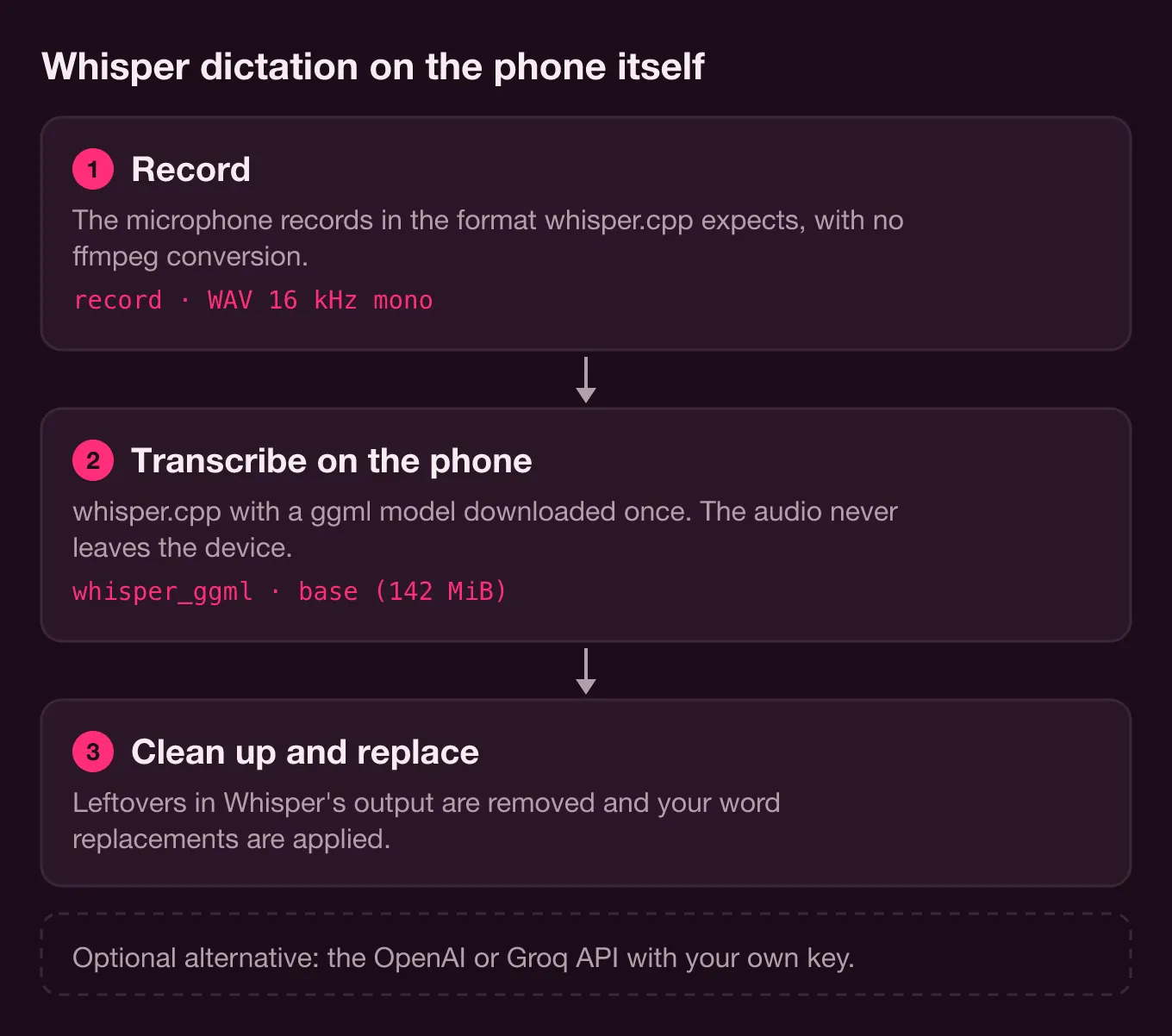
Yes, Whisper runs on your phone offline. With whisper.cpp and a ggml model downloaded once, the phone transcribes speech by itself and the audio never leaves the device. That's how Wendo does dictation.
Wendo is our SSH client for following agents like Claude Code from iOS and Android, and here we explain how dictation is built: which models it offers, how it downloads them, what format it records in, what it does with Whisper's output, and why there's also an option to use the OpenAI or Groq API with your own key.
Whisper offline on your phone: why we use it
Typing to a coding agent on a phone keyboard is slow. Instructions for Claude Code tend to be long sentences ("figure out why the login test fails and don't touch the migration"), and thumbing them out is exactly the tedious part. Talking is faster.
The catch is what you say. When you dictate to an agent you name files, paths, branches and sometimes things that belong to a client. Sending that audio to someone else's server to turn it into text isn't always something you want, and with poor coverage it doesn't even work. So Wendo's default engine is local Whisper. In lib/core/settings.dart the initial value is speechEngine = 'whisper' with the base model, and the settings screen sums it up in one line: "Whisper transcribes on the phone with whisper.cpp: no audio is sent to any server."
whisper.cpp in Flutter: whisper_ggml and record
whisper.cpp is the C/C++ reimplementation of Whisper, OpenAI's speech recognition model, and it uses the ggml weight format. It runs on the CPU without heavy dependencies, and its repository ships official examples for iOS and Android. In Flutter you don't have to write the bindings yourself: several packages on pub.dev wrap it.
Wendo uses two, according to its pubspec.yaml:
record: ^7.1.2
whisper_ggml: ^2.8.1
record captures the microphone and whisper_ggml calls whisper.cpp.
There's a detail that isn't obvious at first. whisper_ggml converts input audio with ffmpeg, and shipping ffmpeg in a mobile app just for that means carrying a large dependency. Since Wendo already records in the format whisper.cpp expects, pubspec.yaml swaps that package for a local stub:
dependency_overrides:
  # whisper_ggml converts audio with ffmpeg; Wendo already records 16 kHz mono WAV (see the package).
  ffmpeg_kit_flutter_new_min:
    path: packages/ffmpeg_kit_stub
The stub (packages/ffmpeg_kit_stub/lib/ffmpeg_kit.dart) implements only execute, which always "fails". On that failure, whisper_ggml transcribes the file as is. If you're building offline Whisper in Flutter with this package and you already record 16 kHz WAV yourself, you can drop ffmpeg the same way.
Which Whisper models it offers and how big they are
Wendo doesn't bundle any model in the app. It offers seven under Settings › Speech, defined in WHISPER_MODELS in lib/core/dictation.dart, in two groups:
- Multilingual: Tiny (75 MB), Base (142 MB), Small (466 MB) and Turbo, which is
large-v3-turbo(the app shows it as 1.6 GB). - English only:
tiny.en,base.enandsmall.en, the same sizes as their multilingual versions.
Those sizes match whisper.cpp's official model table (models/README.md in the ggml-org repository), which lists 75 MiB, 142 MiB, 466 MiB and 1.5 GiB for large-v3-turbo. The Turbo difference is just units: 1.5 GiB is about 1.6 GB.
The main whisper.cpp README also publishes the approximate memory each size uses: about 273 MB for tiny, 388 MB for base and 852 MB for small. On a computer that doesn't matter. On a phone that also has an SSH session, a terminal and maybe a browser open, you notice.
Which Whisper model to use on your phone
The app's own descriptions sum it up: Tiny is "Fastest, lower accuracy", Base is "Fast, good accuracy", Small is "Slower, excellent accuracy" and Turbo is "Maximum accuracy". For dictating to an agent, base is a good starting point, which is why it's the default.
The .en models only understand English. Wendo enforces that in code, so the language setting doesn't affect them:
// The ".en" models only understand English.
final language = whisperModel.endsWith('.en') ? 'en' : settings.whisperLanguage;
If you always dictate in English, they're worth it: OpenAI's Whisper repository says the .en versions perform better in English, especially at the tiny and base sizes. If you mix languages, or speak another language with function names in English, use a multilingual model with the language pinned. Automatic detection (auto) is the default, but in a three-word dictation Whisper has very little audio to guess the language from, and pinning it removes that doubt.
Measure the latency on your phone
We don't publish transcription times, because they depend on the phone, the model and how long you talk. What Wendo does is let you measure it. Under Settings › Speech there's a microphone button to test the engine, and below the recognized text a line shows the engine, model, language, format, audio duration and latency in milliseconds. It comes from TranscriptionResult, which stores durationMs and latencyMs for every transcription. Try base and small with the same sentence and decide with your own numbers.
How a model gets downloaded
Models come from the whisper.cpp repository on Hugging Face, with the standard file name:
const _hf = 'https://huggingface.co/ggerganov/whisper.cpp/resolve/main';
String _fileName(String id) => 'ggml-$id.bin';
When you tap a model you don't have, downloadModel first fetches it into a .part file in the temp folder and, once it's done, moves it to the app's documents folder. If the two folders are on different volumes and the rename fails, it copies the file and deletes the temporary one. That way an interrupted download never passes for a valid model.
A model can still end up corrupted. When whisper.cpp answers "failed to load the model", Wendo doesn't show the raw error: it tells you the model is damaged and asks you to delete it under Settings › Speech and download it again.
Recording in the format whisper.cpp expects
whisper.cpp works with 16-bit PCM WAV at 16 kHz, mono; its README even gives the ffmpeg command to convert to that format. Wendo records that way directly, with record:
const RecordConfig(
  encoder: AudioEncoder.pcm16bits,
  sampleRate: _sampleRate, // 16000
  numChannels: 1,
  androidConfig: AndroidRecordConfig(audioSource: AndroidAudioSource.voiceRecognition),
)
On Android it requests the VOICE_RECOGNITION source, which is meant for speech recognition. PCM chunks pile up in memory while you talk. When you stop, Wendo waits 200 ms for the last chunk to arrive and discards recordings shorter than 0.3 seconds, which are usually accidental taps. Then it prepends a 44-byte RIFF header (encodeWav in lib/components/settings/byok.dart), writes dictation.wav to the cache, transcribes, and deletes the file in a finally, whether things went well or not.
The model stays loaded between dictations (keepModelLoaded: true), so only the first one pays the cost of loading it. If you switch models or delete the one in use, Wendo frees the whisper context first.
Cleaning up what Whisper returns
Whisper doesn't always return dictated text. When it hears no speech, it writes markers like [BLANK_AUDIO] or phrases in parentheses along the lines of "(silence)". In an editor they're harmless; in a terminal they end up in the agent's prompt. _stripNonSpeech removes anything in uppercase square brackets and discards the whole result if it's only a parenthetical or asterisks.
The cleaned text goes to the composer or the terminal. By default it's typed without pressing Enter, so you can check it before sending, unless you turn on Auto Send. Every dictation is kept in a local history (under Settings › Speech › Dictation History) from which you can send it again.
Word replacements
No small model gets "tmux", "kubectl" or your project's name right. That's what word replacements are for: pairs of "what Whisper heard" → "what you meant". The implementation fits in a few lines:
// Word replacements: in order, case-insensitive, active ones only.
String applyReplacements(String text) {
  var out = text;
  for (final replacement in getSettings().dictationReplacements) {
    if (!replacement.enabled || replacement.from.isEmpty) continue;
    out = out.replaceAllMapped(RegExp(RegExp.escape(replacement.from), caseSensitive: false), (_) => replacement.to);
  }
  return out;
}
They're applied in order and case-insensitively, they can be turned off without deleting them, and if the target is empty the word is removed. They work the same with local Whisper and with the cloud. For the proper names in your work, a replacement is cheaper than moving to a bigger model.
The alternative: bring your own key (OpenAI or Groq)
The BYOK ("bring your own key") engine uploads the same WAV to a cloud provider with your API key. Wendo supports two, defined in BYOK_PROVIDERS:
- OpenAI, against
/v1/audio/transcriptions, withgpt-4o-mini-transcribeas the default model. - Groq, against its OpenAI-compatible endpoint, with
whisper-large-v3-turboby default.
You can edit the model field and enter another one your provider supports. Keys are stored in the device keychain, one per provider, and the same screen says it's "only sent" to the chosen provider. The request is a multipart with file, model, response_format: json and, if you haven't left automatic detection on, language.
Both options exist because they solve different problems. Local Whisper is private, works without coverage and costs nothing per dictation, in exchange for storage and memory and for depending on the phone's power. The cloud takes up nothing on the phone and gives you large models that don't fit on it, but the audio leaves the device, you need a connection and you pay the provider. Groq serves the same large-v3-turbo that Wendo offers locally, except it runs it on its servers instead of your phone. OpenAI adds its own transcription models.
Our recommendation: start with base locally and a handful of replacements. If you dictate a lot, your phone struggles with large models and you don't mind the audio leaving it, move to BYOK.
Trying it
Dictation is one part of Wendo, which isn't in the app stores yet. You start it with the microphone in the terminal bar or the composer, or by holding down the keyboard button, which is the default gesture. If your computer isn't set up yet for talking to an agent from your phone, start with how to use Claude Code on your phone, and to keep the session alive while you dictate, the minimum tmux for coding agents.