 Lirafy
How we built a Flutter SSH client with Mosh and Eternal Terminal
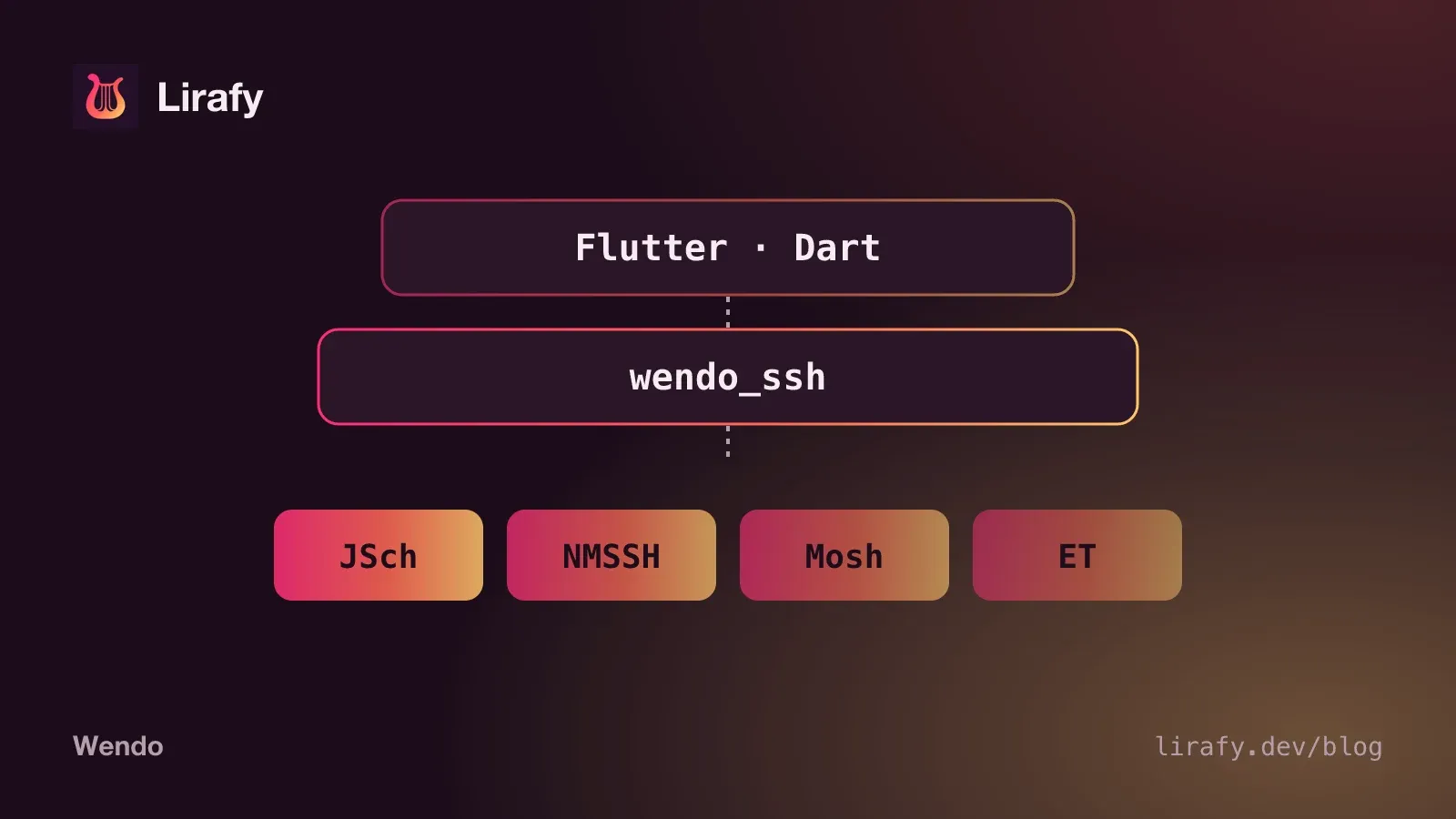
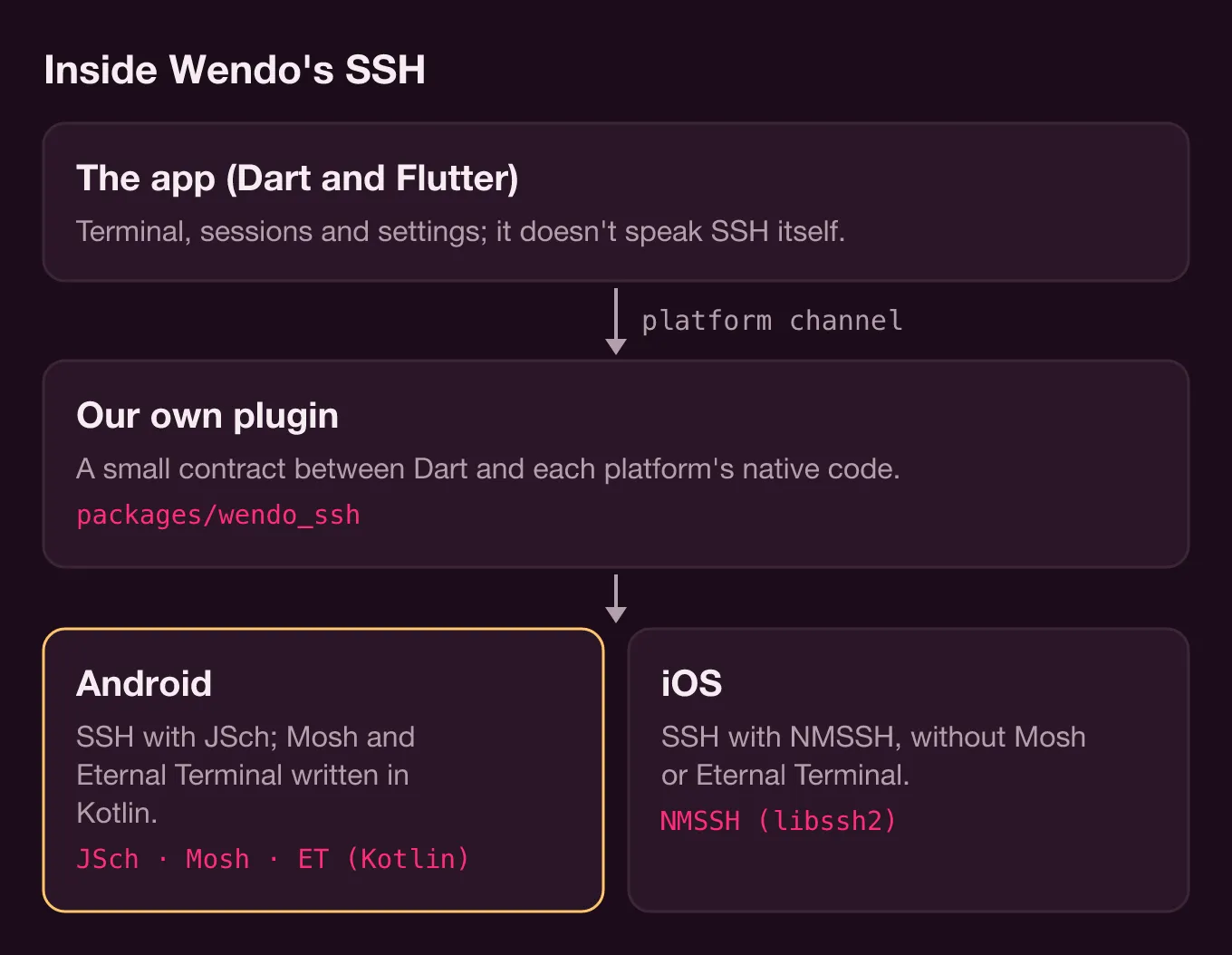
In Wendo, the Flutter SSH client isn't written in Dart. The app talks to our own plugin, packages/wendo_ssh, over a platform channel, and each OS brings its own library: JSch on Android and NMSSH (libssh2) on iOS. Mosh and Eternal Terminal don't come from any library at all. We implemented both protocols ourselves in Kotlin, and for now they only exist on Android. Here's how it's put together, the problems we had to solve along the way and the trade-offs that are still there.
A Flutter SSH client: a native plugin with a small contract
The plugin lives in packages/wendo_ssh, and the Dart side is thin: a MethodChannel for commands and an EventChannel for everything that comes back from the server.
static const _methods = MethodChannel('wendo_ssh');
static const _events = EventChannel('wendo_ssh/events');

Future<ConnectResult> connect(ConnectOptions options) async {
  final map = (await _call<Map>('connect', {'options': options.toMap()}))!;
  ...
}connect, write, resize, exec, forwardPort and disconnect are the same for all three transports. The events (onData, onClose, onTransportStatus) come out of a single native stream that WendoSsh dispatches by name. Two details we're glad we got right: bytes from the server reach Dart as a Uint8List, with no base64 in between, and errors arrive as an SshException with a code (ERR_AUTH, ERR_MOSH_UDP, ERR_ET_GONE…) that the UI turns into a useful message.
On the native side, anything that blocks stays off the main thread: coroutines on Dispatchers.IO on Android, and a dedicated DispatchQueue (wendo.ssh.io) on iOS. Events always come back on the main thread, which is what EventChannel requires. On iOS we had to add a function that unwraps Optional values nested inside an Any, because the channel codec doesn't accept them.
SSH on Android with JSch
On Android we use the maintained fork of JSch (com.github.mwiede:jsch) together with BouncyCastle. Android ignores META-INF/versions, so JSch ends up on its Java 8 classes, and those hand ed25519, curve25519 and ML-KEM over to BouncyCastle. Without that dependency, the ed25519 keys the app generates wouldn't work.
There's a bug that only shows up in release builds. JSch and BouncyCastle load classes by name, and R8 strips them because it can't see anyone using them. If you search for "Flutter SSH client" you'll find the same problem on the ssh2 package page (a ClassNotFoundException for com.jcraft.jsch.jce.Random). In wendo_ssh the rules live in consumer-rules.pro, so any app using the plugin inherits them without touching anything.
Three more details from SshSession.kt that you won't see in any example:
- Every call to JSch's
getInputStream()creates a new pipe. You have to ask for it beforechannel.connect(), or you lose the first thing the server sends (the prompt, the MOTD). sshdallows 10 channels per connection (MaxSessions), and the shell, the forwards and the agent already take some of them. With manyexeccalls at once we got "channel is not opened", so they're capped.- Polling
available()every 20 ms didn't even reach 100 KB/s, and the chat view reads hundreds of KB of transcript. We switched to blocking reads.
SSH on iOS with NMSSH
On iOS, SSH runs on NMSSH 2.3, which bundles libssh2 1.8.0. The app declares it in its Podfile with :modular_headers => true so it can be imported from Swift. The old libssh2 version has consequences. Agent forwarding needs the LIBSSH2_CALLBACK_AUTHAGENT callback, which arrived in libssh2 1.9.0; NMSSHAccessors.m only registers it if the header defines it, and otherwise compiles to an empty function. To reach the raw libssh2 channel that NMSSH keeps in a private property, the same file reads the instance variable with ivar_getOffset.
We also had to write bcrypt_pbkdf in Swift (BcryptPbkdf.swift, following OpenSSH's) to decrypt passphrase-protected OpenSSH private keys. And NMSSH closes the channel before returning a command's result, so libssh2_channel_get_exit_status almost always returns 0. The code checks NMSSH's error so a failed command doesn't look like a success.
The arm64 simulator
NMSSH's libraries don't ship the arm64 simulator slice, which is the one a Mac with Apple Silicon uses. The fix lives in the Podfile's post_install: with WENDO_SSH_SIM_LIBS=1, it swaps NMSSH's .a files for libssh2 1.11.1 and OpenSSL 3.4.0 built for arm64-ios-simulator, which sit in packages/wendo_ssh/ios/libs, and excludes x86_64 from every target.
(cd ios && WENDO_SSH_SIM_LIBS=1 pod install) && WENDO_SSH_SIM_LIBS=1 fvm flutter build ios --simulator --debugThose libraries do include the agent callback, so forwarding works in the simulator. They aren't linked on a device: there you build without the variable.
Mosh in Flutter: written in Kotlin, Android only
Mosh only uses SSH to get started. Wendo opens a connection with JSch and launches the server like this (MoshBootstrap.command):
sh -lc 'PATH="$PATH:/opt/homebrew/bin:/usr/local/bin:$HOME/.local/bin"; export PATH; echo "WENDO_SSH_CONNECTION=$SSH_CONNECTION"; exec mosh-server new -s -c 256 -l LANG=en_US.UTF-8 --'Everything goes to sh in single quotes because the user's shell might be fish. The $SSH_CONNECTION line is there for the "Use server IP for UDP" option. If the server doesn't have the en_US.UTF-8 locale, it retries with C.UTF-8. From the output we read MOSH CONNECT <port> <key>, and from then on everything goes over UDP.
The client implements the Mosh 1.4 protocol in Kotlin, following network.cc and the transport files: AES-128-OCB packets with BouncyCastle (MoshCrypto.kt), the four protobuf messages we need written by hand (MoshProto.kt), MTU fragmentation, acks, retransmissions and port hopping. When there's been no round trip for a while, the client opens another socket with a different source port, and the server follows as soon as it sees packets arriving from the new address. That's how it survives switching from Wi-Fi to cellular.
The screen is the part with the most traps. Mosh doesn't send the application's byte stream. It sends the difference between two screens, and that diff is only valid against the state it starts from. MoshScreen.kt keeps a shadow screen that interprets only the dialect Display::new_frame emits, without being a full emulator. On top of it sits MoshPrediction.kt, our implementation of local echo prediction (PredictionEngine) in adaptive, always and never modes. Predictions have to be removed before applying each server diff and painted again afterwards, in the same chunk, so xterm never shows anything half done.
Two more details. mosh-server assumes the terminal sends arrow keys in application mode, so cursorKeysToSs3 rewrites ESC [ A to ESC O A; otherwise vim and tmux don't recognize them. And if the first UDP packet doesn't arrive (6 s with Auto, 12 s with Mosh picked by hand), the freshly launched mosh-server is killed and the error tells you to check the firewall.
The JVM tests (MoshServerTest.kt) talk to a real local mosh-server 1.4, including a simulated link with 120 ms each way, to check that when you stop typing, xterm shows exactly the server's screen.
Eternal Terminal and an app the OS kills
A Mosh session dies with the app process, and no design gets around that. The server keeps nothing to catch up from, and the OCB nonce is the packet sequence number, which starts at 0 in every process. Resuming would reuse nonces with the same key, and in OCB that leaks plaintext and breaks authentication. That's why Wendo never saves Mosh state.
Eternal Terminal 7.0 can be resumed, and its client is Kotlin too: EtClient.kt, with crypto_secretbox (XSalsa20-Poly1305) built on BouncyCastle. If TCP drops, it reconnects every second and each side says how many packets it has read so the other resends the missing ones. To survive Android killing the app, EtStateStore.kt stores the session id and key in the app's private files, sealed with an AES-256-GCM key from the Android Keystore, plus a log of every encrypted packet, written before it goes out on the socket. The ET nonce is a consecutive counter that allows no gaps, so that write-ahead log is what guarantees the next nonce is the right one. When you reopen the app, restoreRecoverableSessions() matches what the native side kept against the cards saved in Dart, and the sessions reappear on Home. In the app, ET is still marked experimental.
Mosh and ET also need an SSH channel for exec and port forwards. SideConnection.kt keeps the bootstrap connection, but checks it before every use. If it dropped with the network change, it opens another one with the same fingerprints and restores the forwards on the same local ports.
What the Dart side does
lib/core/sessions.dart keeps each session's output (up to 512 KB) even when no terminal is open, so it can repaint when you come back. With Mosh, when a full screen (reset) arrives, the earlier output is dropped. The onTransportStatus event carries silentMs and rebindInMs, and the UI uses them to warn that the server isn't responding instead of closing the session. If you turn off "Keep Alive in Background", SSH sessions close when the app goes to the background. Mosh and ET sessions stay, because disconnecting them would kill the remote session.
Auto mode lives in openSession(). It tries Mosh, then ET only if a port is configured or something answers on 2022 (so long waits don't stack up), and finally SSH. With a Jump Host or agent forwarding it goes straight to SSH, and an authentication or fingerprint error doesn't fall through to the next one, because SSH would fail the same way.
The trade-offs that remain
- iOS only has SSH. Asking for Mosh or ET returns
ERR_MOSH_UNSUPPORTEDorERR_ET_UNSUPPORTED, and Auto goes straight to SSH. - Neither Mosh nor ET supports a Jump Host.
- Mosh only syncs what's visible on screen. For scrollback, work inside tmux, as the docs explain.
- Mosh and ET are part of Wendo Pro; without Pro,
limitToPlankeeps the connection on SSH.
If what you want is to pick a transport for following Claude Code from your phone, rather than how it's built, there's a practical comparison in Mosh vs SSH on your phone, and the fields for each connection are in the docs on sessions that survive drops. How the app uses that same SSH for alerts, with no server of our own, is in a mobile app without a backend.